
Refresh, Rebuild, or Something in Between? How to Make the Right Call for Your Website.
March 23, 2026
2 Minutes of Your Time
Quick Summary
Deciding whether to refresh or rebuild your website is one of the most consequential calls a marketing team can make. Choose wrong and you either waste budget on a rebuild you didn't need or apply a cosmetic fix to a structural problem. By understanding what your site actually needs, your team can:
- Avoid costly decisions driven by appearance rather than platform health
- Extend the life of a well-built site through targeted, high-impact improvements
- Identify when technical debt has grown beyond what a refresh can resolve
- Consider a phased approach that delivers quick wins while planning for long-term investment
- Make a confident, informed decision without needing to be a developer to do it
Your website feels off. Now what?
Maybe it looks dated. Maybe your team dreads logging in. Maybe you’ve launched a new service, shifted messaging, or realized your three-year-old site no longer fits who you are.
Now you're facing a common marketing question: fix what you have or start over?
It's a fair question, and a costly one to get wrong. A premature rebuild burns budget and time. A surface-level refresh applied to a fundamentally broken site just delays the inevitable. Getting it right starts with understanding what the site actually needs, not just what it looks like it needs.
What a refresh actually means
A refresh leaves the foundation and improves what's on top. It’s targeted renovation, not demolition.
A refresh fits when your CMS is supported, the content structure is sound, and issues are visual or functional, not structural. If you're on a current WordPress or Drupal and manage content easily, refreshing is usually faster and more cost-effective.
Common refresh improvements include:
- Updating the design to reflect your current brand
- Reorganizing navigation so users can find what they need faster
- Improving calls to action and conversion paths
- Addressing accessibility gaps, such as contrast ratios, alt text, and keyboard navigation
- Optimizing page speed and mobile performance
- Cleaning up metadata and on-page SEO structure
A refresh won't fix everything. Its purpose is to extend a site with solid bones.
When a full rebuild is the right answer
Some sites have issues that a new look won’t fix. Outdated platforms, unmanageable codebases, or goals that outgrow architecture point to a rebuild as the honest path.
These are the signs that point toward a rebuild:
- Your CMS is end-of-life or no longer receives security updates.
- Custom code has accumulated to the point where changes create new problems.
- You're introducing fundamentally new features or user experiences.
- Integrations with CRM, payment, or third-party platforms are failing or missing.
- Your team spends more time on workarounds than on actual content.
- Every fix feels temporary.
A rebuild is a larger investment, but it clears technical debt, establishes a clean foundation, and positions the site for the next several years rather than the next several months. When done with a clear plan and the right partner, it pays for itself.
The option most teams overlook: a phased approach
Here's what many agencies won't tell you: refresh and rebuild aren't always an either/or decision.
If you need improvements now but aren’t ready for a full rebuild, a phased approach bridges the gap. Improve design, accessibility, and performance now while planning a rebuild for later.
This works well for lean marketing teams: quick results, competitiveness, and time to align and budget. It prevents rushed rebuilds that often lead to scope creep and a site needing another rebuild sooner.
A phased plan isn’t a compromise. For many, it’s the smarter way to manage digital investment.
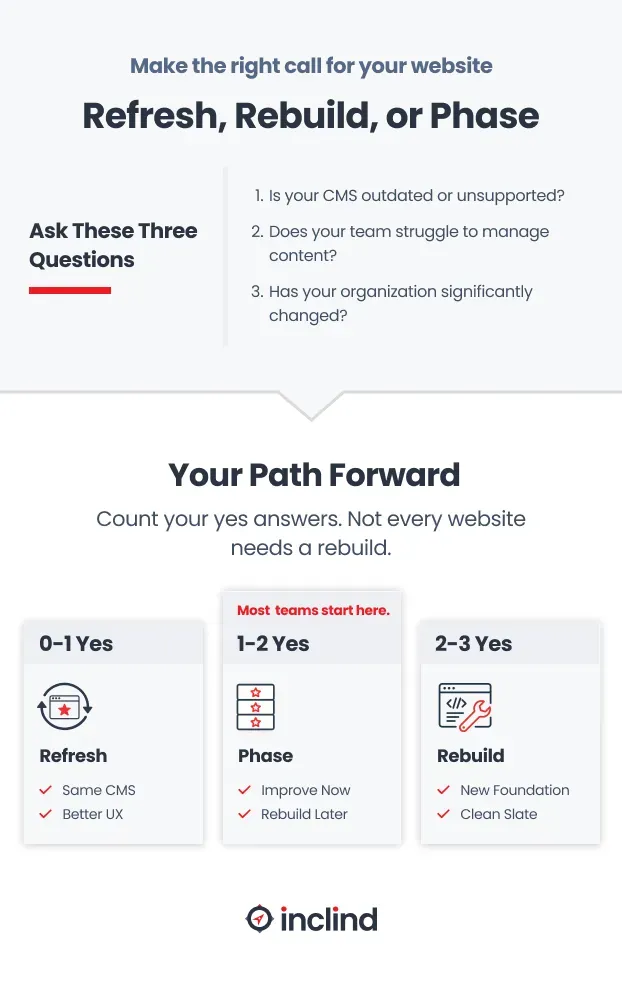
How to decide: three questions worth asking
Before committing to any path, it helps to slow down and answer these honestly.
Is the platform still supported and stable? If you're running an outdated version of Drupal or a heavily customized WordPress install that your team is afraid to update, that's a technical risk that a refresh alone won't address. Platform health is the first filter.
Can your team actually manage the site today? Content editors who struggle to publish updates, create new pages, or maintain consistent formatting are dealing with a structural problem. If the CMS is working against your team rather than for them, that friction compounds over time.
Has your organization changed significantly since the site launched? New services, a rebrand, a shift in audience, a merger. If the site was built around a version of your organization that no longer exists, a refresh may only add confusion rather than clarity.
If you answered yes to one of these, a refresh with targeted improvements may be all you need. Two or three yes answers point toward a rebuild, or at least a serious phased plan.
What’s the Next Best Step for Your Team?
You don't have to figure this out alone.
The refresh vs. rebuild decision isn't purely technical. It involves budget, capacity, organizational priorities, and a clear-eyed assessment of where the site is today and where it needs to go.
At Inclind, we work with marketing teams at this exact crossroads all the time. Our process starts with understanding your goals, auditing what's working and what isn't, and helping you build a plan that reflects both your immediate needs and your longer-term vision. We're not here to sell you the biggest project. We're here to help you make the right call.
If you're trying to figure out what your site actually needs, let's talk. A 30-minute conversation is usually all it takes to start pointing in the right direction.
MORE NEWS
